How to Transcribe a YouTube Video
How to transcribe a YouTube video, even one with no captions — paste the link, edit the timestamped transcript and export TXT, SRT or VTT. Free to try.
Updated November 15, 2026 · From the video transcript generator team
Why YouTube's own transcript isn't enough
YouTube only shows a transcript when the video has captions, either added by the uploader or generated automatically. When it does, the Show transcript panel under the description lets you read along, but it is awkward to reuse:
- You have to select and copy the text by hand, and on the phone app you can barely copy it at all.
- There is no download button: no text file, no SRT, no VTT.
- You cannot fix mistakes, so misheard names stay misheard.
- When a video has no captions, there is no transcript at all.
A transcript tool solves all four: it gives you the whole text with timestamps, lets you correct it, and exports it as a file.
If you only need to read along once, YouTube's panel is fine. On a computer:
- Open the video and click ...more under the title to expand the description.
- Scroll to the end of the description and click Show transcript.
- The transcript opens next to the video. Use the three-dot menu in the panel to turn timestamps on or off.
If Show transcript is missing, the video has no captions, and only a speech recognition tool can give you the text. The rest of this guide covers both cases.
Step 1: Copy the YouTube video link
On a computer, copy the address from the browser bar while the video is open. On the YouTube app, tap Share, then Copy link. Both kinds of link work, as do Shorts links. You do not need to download the video.
Step 2: Paste the link and transcribe the video
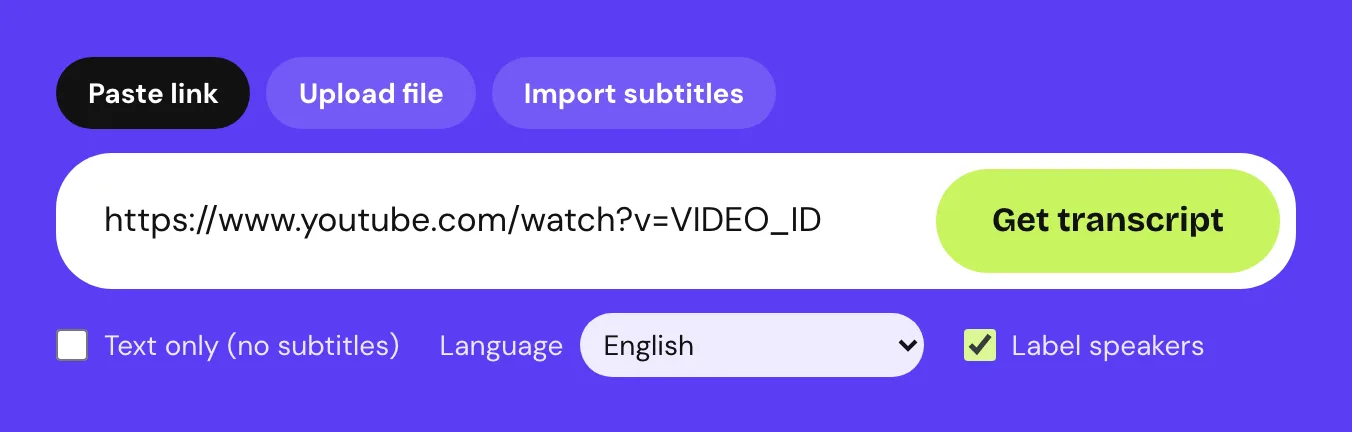
Open the YouTube transcript tool, paste the link into the box and click Get transcript. Under the box you can set the spoken language, or leave Detect automatically on, and tick Label speakers for interviews and podcasts.
A quote appears before anything runs. It shows the video's title, the method and the minutes it uses:
- Captions first: the video has captions, so their text and timing are reused. This is the fastest route.
- Speech recognition: there are no usable captions, so the sound is transcribed.
Click Start transcript to go ahead. If the video cannot be read or the job fails, every minute goes back to your balance.
Step 3: Clean up the text and label speakers
The finished transcript has a timestamp on every line. Click Load YouTube player to watch the video next to it; clicking any line then jumps the video to that moment. The player is optional, because loading it connects your browser to YouTube.
Click Edit to fix words. Automatic captions in particular tend to miss names and brand names, and they rarely use punctuation well. If you ticked Label speakers, rename Speaker 1 and Speaker 2 under Speaker names. Your original transcript stays saved next to every edited version.
The search box above the transcript finds a word and jumps between matches, which is handy for long videos.
Step 4: Export for re-upload or for reading
Pick the format by what you will do next:
| You want to | Download |
|---|---|
| Read, quote or paste into a document | Download text as TXT |
| Keep the timestamps in your notes | Download text as Markdown |
| Upload captions to YouTube or a video editor | Download captions as SRT |
| Use captions in a web player | Download captions as VTT |
Copy script copies the plain text straight to your clipboard.
Transcribing a YouTube video with no captions
This is where a transcript tool helps most, because YouTube has nothing to show you. Not every video has captions: automatic captions can be turned off by the uploader or be unavailable for the spoken language.
You do not need to check first. Paste the link as usual: when the video has no usable captions, the quote says Speech recognition, and the sound is transcribed by a speech model instead. It takes a few minutes longer than reusing captions, and the timestamps come from the speech recognition, not from guesses.
How to download the transcript as a file
Once the transcript is ready, the download buttons sit right above it:
- Click Download text for a TXT or Markdown file.
- Click Download captions for an SRT or VTT subtitle file.
- The file saves under the video's title, so it is easy to find later.
Here is what a VTT file looks like:
WEBVTT

00:00:00.000 --> 00:00:02.800
In this video I will show you the whole setup,

00:00:02.800 --> 00:00:05.400
from the first cable to the finished recording.
Need the other subtitle format later? The free SRT to VTT converter changes it in your browser. Want plain text from a subtitle file you already have? Use SRT to text.
Does it work with YouTube Shorts?
Yes. A Shorts link goes through exactly the same steps. If the Short has no captions, it takes the speech recognition route, which is still quick for a clip under a minute.
Long videos: 2-hour interviews and podcasts
The free trial covers videos up to 10 minutes. Paid plans accept a single video of up to 2, 3 or 4 hours depending on the plan, and minutes are counted per started minute of the video. See pricing for the details.
For long interviews and podcasts, three things save time:
- Tick Label speakers before you start, so every line shows who said it.
- Use the search box to jump to the parts you need instead of scrolling.
- Leave the page while it runs. The job keeps going, and the transcript waits in your workspace.
If you have the video as a file, for example your own upload, you can also transcribe it from your device; see how to transcribe any video or the MP4 to transcript tool.
Frequently asked questions
Can I get a YouTube transcript without captions?
Yes. When a video has no captions, its sound is transcribed with speech recognition instead. It takes a few minutes longer, and the quote shows the method before you confirm.
How do I download subtitles from a YouTube video?
Paste the video link into the YouTube transcript tool, start the transcript, then choose Download captions and pick SRT or VTT. The file keeps the timing of every line.
Does it work with Shorts?
Yes. Paste a Shorts link the same way as a regular video link.
Can I transcribe a private or unlisted video?
Private and members-only videos cannot be opened, and nothing is charged when a video cannot be read. If the video is your own, upload the file from your device instead.
Where do the timestamps come from?
From the video's captions when it has them, or from speech recognition when it does not. They are never estimated or invented.